|
|
|
|
|
This software was checked for viruses 3 months ago and was found to contain no viruses.
Click here
to see antivirus report.
|
|
| |
|
Review
This is official description
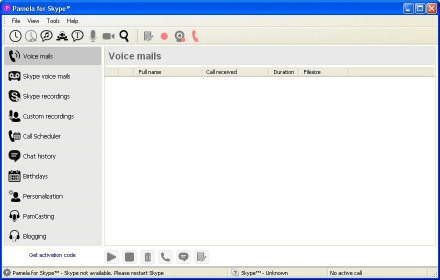
Pamela Pro is a program that can record Skype audio and video calls. It can be set to record calls automatically. We can also record chat messages. There are features like call scheduler, conference manager, birthday reminders, email forwarding, etc. The Auto mood/status change feature automatically changes the Skype mood and status as soon as a call starts.
The following review written by one of the Software Informer contributors applies to version 4.6
Most successful software companies polish their products by adding up some extensions or add-ons developed by other companies. Since February 2009, Skype is benefiting from a powerful add-on called Pamela Pro. Officially certified by Skype, this tool is, initially, a message and call recorder, though it comes with many other handy features to help you manage all your Skype calls.
With this recording utility, you can register any audio and video call coming through Skype into WAV, MP3, or Ogg. It allows you to play back any recorded call when required, which will help you whenever you are legally required to record certain calls or for training purposes. During the call you can easily take notes, or add them later for future reference. With very little configuration, Pamela Pro can turn into an answering machine for your Skype’s text chat, and your audio and video calls.
Its built-in Rich Mood Editor allows you to add emoticons and country flags to your text messages. Besides, the Emotion Sounds Player allows you to add extra sound effects to your conversation. You can enlarge this sounds library with your own sound files.
Finally, this application will allow you to personalize your Skype contacts, and is fully compatible with Skype’s Podcasting and Blogging functionalities. |
- Skype certified.
- Supports 64-bit operating systems also.
|
- No support for Mac/Linux.
|
|
Reviewed by: Sundaram Ramanujam Reviewer rating: Reviewed: Last year
|
What's new in version 4.8
Bugfix: Email forwarding did not work with SSL connections Bugfix: At the end of the default voicemail file the last second was repeated Feature: Pamela now supports Ukrainian language. Thanks to Bogdan Donchura. Feature: Added option to add notes to Chat history Feature: Added Auto-Hide feature to Custom Video recording window Feature: Updated Windows 7 taskbar menu – added Call and Custom recording management items which appear during a recording Change: Redesigned the personalization module for easier use Change: Added “Group (Conference)” and “Offline to Voicemail” status-images to Pamela main window Change: Made changes to the Skype Connection module to increase application speed and Skype 5.5 compatibility Change: Removed “Send Email to…” from context menu Change: Improved application perfomance for Chat and Chat History, Call recording, Voicemails and Custom recordings Change: Improved the Call Scheduleder module (fixes and performance) Bugfix: Fixed bug with contact names XML storage Bugfix: Fixed problem with Skype API connection which can result in loss of connection to Skype What's new in version 4.6
Completely reworked Skype Video Recording system.
Record a custom video directly from your Webcam. What's new in version 4.5
Completely reworked Skype Video Recording system.
Record a custom video directly from your Webcam. |
|
Report a wrong version
Report a wrong program title
Suggest a correction
|
Screenshots
All 8 screenshots |
|
|